Terraform, Demystified: What It Is, How It Really Works, and Why It Changed Infrastructure Forever
Infrastructure as code from the ground up: what Terraform does, how the plan/apply workflow really works, every file type explained, remote state on Azure, and the OpenTofu split.
“The best way to predict the future is to declare it.”
I first understood Terraform after a “quick” Azure Portal change broke staging. There was no commit, review, or record. A few manual changes later, staging no longer matched production, and nobody could explain why.
This explains what Terraform does, how its workflow works, its main files, licensing, and Azure remote state.
1. Why Terraform Is Needed (The Pain Before the Fix)
Infrastructure is often managed manually through cloud portals, one-off CLI commands, or quick SSH fixes. This approach, commonly called ClickOps, feels fast until an environment becomes difficult to understand or reproduce.
Typical problems include:
- No single source of truth: Engineers may disagree about what is deployed.
- Configuration drift: Temporary manual changes become permanent and undocumented.
- Poor reproducibility: Rebuilding an environment means repeating every step manually.
- No review or audit trail: Changes can reach production without approval or history.
- Team conflicts: Multiple engineers changing the same environment can cause outages.
Terraform solves these problems by defining infrastructure as code. Changes can be committed, reviewed, compared, and applied consistently.
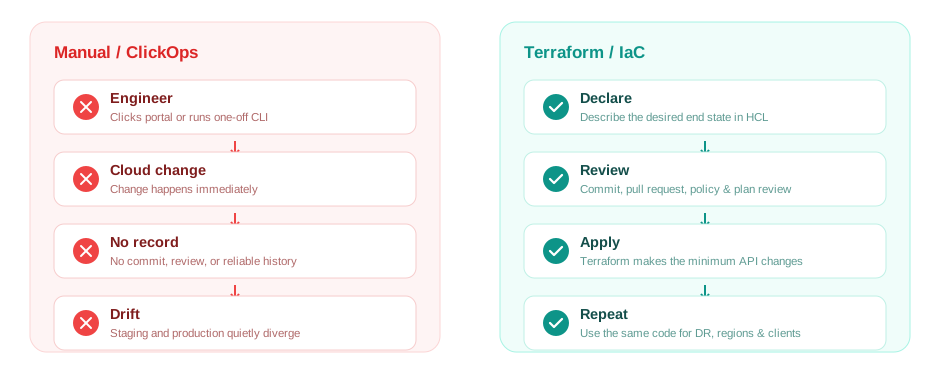
From ClickOps to Infrastructure as Code: infrastructure becomes a reviewed system of record instead of a collection of remembered manual actions.
2. What Terraform Actually Does
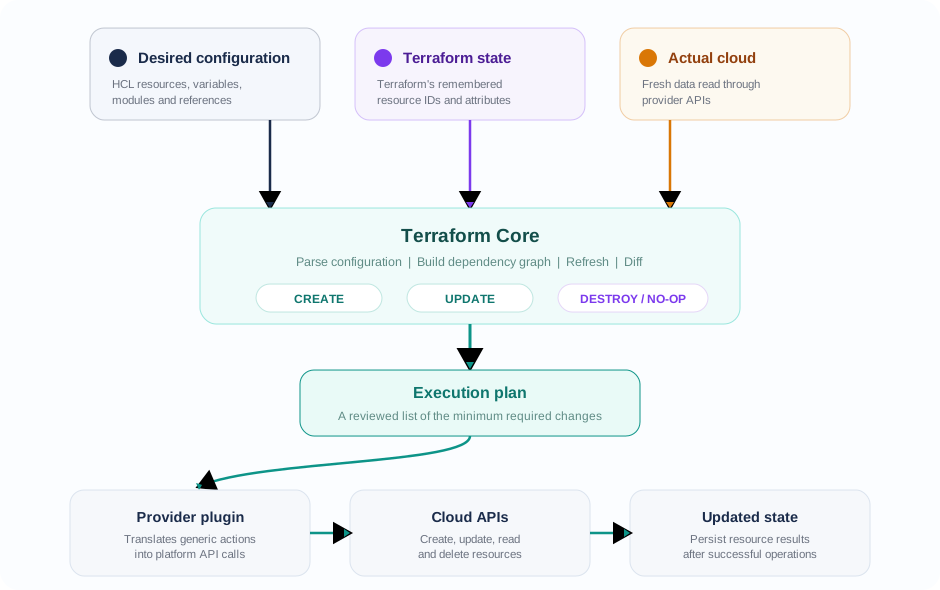
Terraform does not execute a fixed script. It compares the infrastructure defined in code with what currently exists, then calculates the API changes required to make them match.
This is the declarative model. Instead of scripting every action in order, you describe the desired end state. Terraform determines the correct order through a dependency graph.
3. How Terraform Does It: The Core Building Blocks
Terraform configuration is written in HCL, or HashiCorp Configuration Language.
| Concept | Purpose |
|---|---|
| Provider | Connects Terraform to Azure, AWS, Kubernetes, and other platforms. |
| Resource | Represents infrastructure Terraform manages. |
| Data source | Reads existing infrastructure information. |
| Variable | Makes configuration reusable. |
| Output | Exposes useful values after an apply. |
| Module | Packages reusable resources together. |
| State | Records what Terraform manages. |
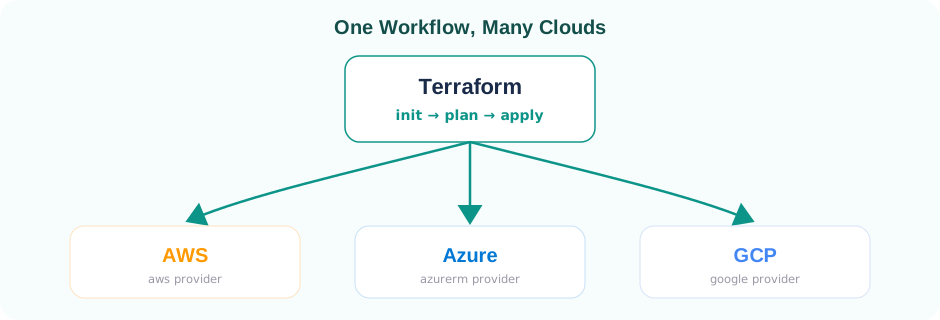
Providers give Terraform its flexibility. The same init → plan → apply workflow works across Azure, AWS, and GCP. Only the provider and resource types change.
Providers are separate plugins rather than part of Terraform Core. They communicate with Core through RPC, allowing the same engine to manage many platforms.
How Terraform Reconciles Desired and Actual State
Terraform continuously compares configuration, state and real infrastructure before deciding what to change.
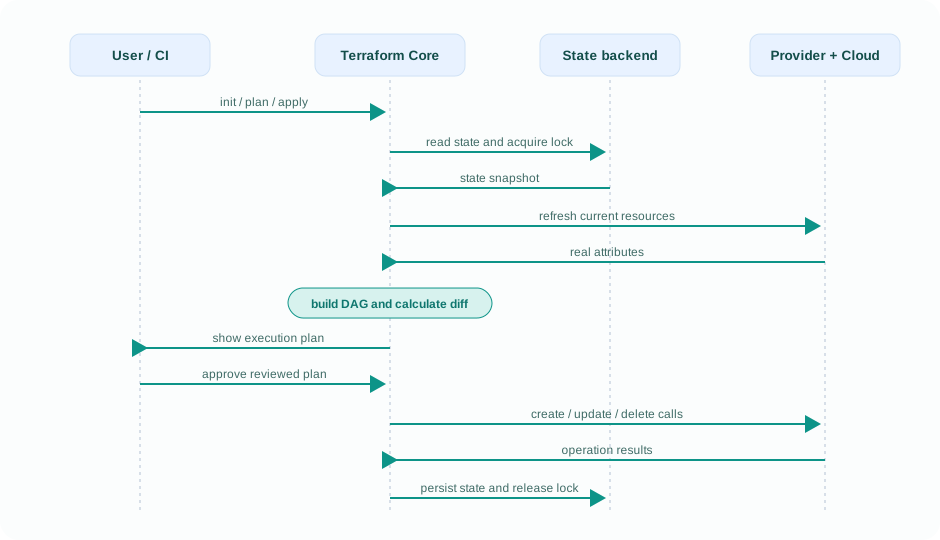
4. Behind the Curtain: What Actually Happens When You Run terraform apply
There is a clear process behind what happens when you run terraform apply. It is not magic, Terraform follows a deliberate four-step workflow.
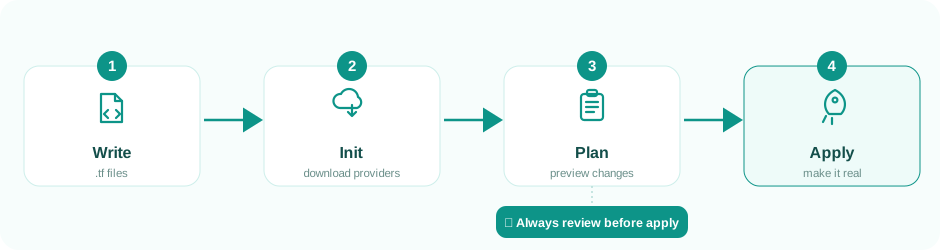
Write your .tf files, run init, review changes with plan, and use apply only after confirming the output. Let’s see what each step does behind the scenes.
Step 0, Write
Create .tf files describing the desired infrastructure. Nothing is created yet. This is where you define names, variables, dependencies, and modules.
Step 1, terraform init
terraform init prepares the working directory by detecting providers, downloading plugins into .terraform/, connecting to the backend, and creating .terraform.lock.hcl to pin provider versions.
Step 2, terraform plan
terraform plan loads the current state, refreshes resource information through provider APIs, and builds a Directed Acyclic Graph, or DAG, from resource dependencies.
Terraform compares the desired configuration, recorded state, and real infrastructure. It then decides whether each resource should be created, updated, replaced, destroyed, or left unchanged.
Always review the plan carefully. It can reveal unexpected changes or deletions before they affect the environment. A plan can also be saved so terraform apply executes exactly what was reviewed.
Step 3, terraform apply
Terraform walks the dependency graph again and sends real create, update, or delete requests through the providers.
As operations succeed, Terraform updates the state. With a supported remote backend, it also locks the state to prevent multiple users or pipelines from applying simultaneously.
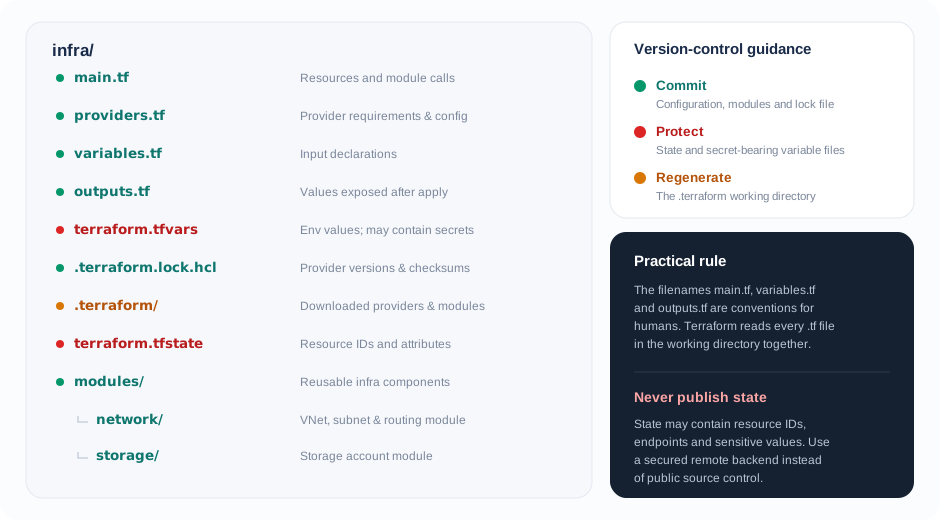
5. Every Terraform File Type, Explained
I got confused by these when I started, so here’s the cheat sheet I wish I’d had:
| File / Directory | Purpose |
|---|---|
.tf | Main Terraform configuration written in HCL. All .tf files in a directory are loaded together; names such as main.tf and variables.tf are only conventions. |
.tf.json | Terraform configuration written in JSON, usually generated by another tool. |
.tfvars | Stores variable values, often for different environments. Used with -var-file. |
.tfvars.json | JSON version of a .tfvars file. |
.tfstate | Tracks managed resources, IDs, and attributes. It may contain sensitive data and should not be committed publicly. |
.tfstate.backup | Backup of the previous local state file. |
.terraform.lock.hcl | Pins provider versions and checksums. Commit this file to Git. |
.terraform/ | Generated by terraform init; contains downloaded providers and modules. Do not commit it. |
| Module directory | A reusable folder of .tf files referenced through a module block. |
Terraform Projects Files at a Glance
A visual folder tree makes it easier to remember what belongs in Git, what is generated, and what must be protected.
6. Is Terraform Still Open Source?
Until August 2023, Terraform used the OSI-approved MPL 2.0 license. HashiCorp then moved future releases to Business Source License 1.1, making Terraform source-available rather than fully open source.
This led to OpenTofu, a community-driven fork based on the last MPL-licensed release.
Today:
- Terraform: Developed by HashiCorp, now part of IBM, under BSL 1.1.
- OpenTofu: Community-governed and licensed under MPL 2.0.
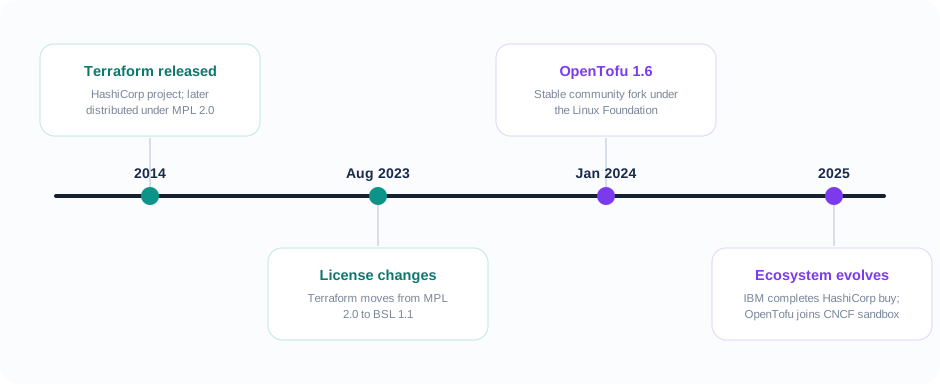
Both use HCL and follow a similar workflow; licensing and governance are the main differences. Most concepts in this article apply equally to both tools, so teams can choose based on governance, licensing, ecosystem support, organizational requirements, and their long-term technical strategy.
7. Azure Example: The Basics
Here’s a minimal, real example, a Resource Group and a Storage Account, the kind of thing I write in almost every Azure project as a starting point:
terraform {
  required_providers {
    azurerm = {
      source  = "hashicorp/azurerm"
      version = "~> 3.0"
    }
  }
}

provider "azurerm" {
  features {}
}

resource "azurerm_resource_group" "rg" {
  name     = "rg-blogdemo-prod"
  location = "Central India"
}

resource "azurerm_storage_account" "sa" {
  name                     = "stblogdemoprod001"
  resource_group_name      = azurerm_resource_group.rg.name
  location                 = azurerm_resource_group.rg.location
  account_tier             = "Standard"
  account_replication_type = "LRS"
}
That one line, resource_group_name = azurerm_resource_group.rg.name, is doing more than it looks like. It’s what tells Terraform’s graph builder “this storage account depends on that resource group,” so it knows to create the resource group first, without you ever writing that ordering explicitly.
8. Remote State and Azure Backends
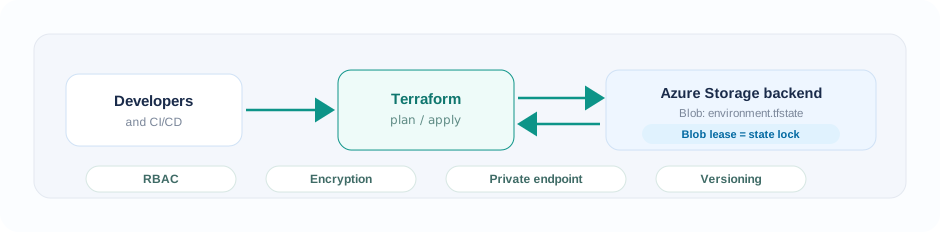
By default, Terraform stores state locally in terraform.tfstate. That is acceptable for experiments but risky for teams because state may contain sensitive values and multiple people may update it.
A common Azure pattern is storing state in an Azure Storage Account:
terraform {
  backend "azurerm" {
    resource_group_name  = "rg-tfstate"
    storage_account_name = "sttfstateshared001"
    container_name       = "tfstate"
    key                  = "blogdemo.prod.tfstate"
  }
}
This provides centralized state, Blob lease-based locking, encryption at rest, and optional versioning.
9. Can Terraform Create Its Own Backend?
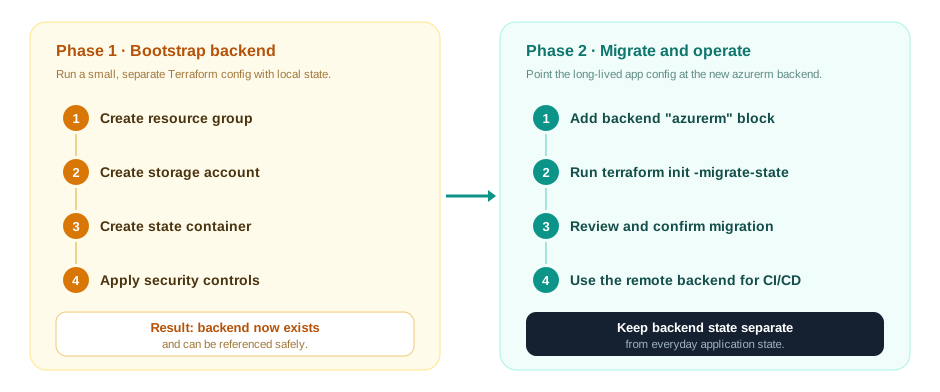
Not in the same apply. Terraform initializes the backend during terraform init, before evaluating resources. The storage account and container must already exist.
Use a two-phase bootstrap:
- Create the backend resource group, storage account, and container with a small configuration using local state.
- Configure the
azurermbackend in the main project and runterraform init -migrate-state.
Treat the backend as infrastructure for Terraform, not infrastructure created by the same configuration that depends on it. Keep it in separate configuration and state.
10. Closing Thoughts
Terraform’s power comes from combining declarative configuration, dependency graphs, provider plugins, state, and locking.
Once you understand what happens between plan and apply, Terraform stops feeling like a black box. It becomes a reconciliation engine that aligns what is running with what is defined in code.
Whether you choose Terraform or OpenTofu, these core ideas remain the same.