Helm: From Deploying Charts to Designing Production-Grade Kubernetes Applications
Your first Helm command installs someone else's chart in one line. It feels like magic, until you need to change something. That's when Helm stops being a tool and starts being engineering.
Your first Helm command is almost always the same:
helm install
One line, and an entire application lands in your cluster. It feels like magic, right up until you need to change something.
Installing a chart is easy. But how do I build one that’s reusable, works across environments, and can be upgraded or rolled back safely?
That’s the question a lot of Kubernetes engineers get stuck on, and it’s a good place to get stuck. It means you’ve stopped copying commands and started thinking about design.
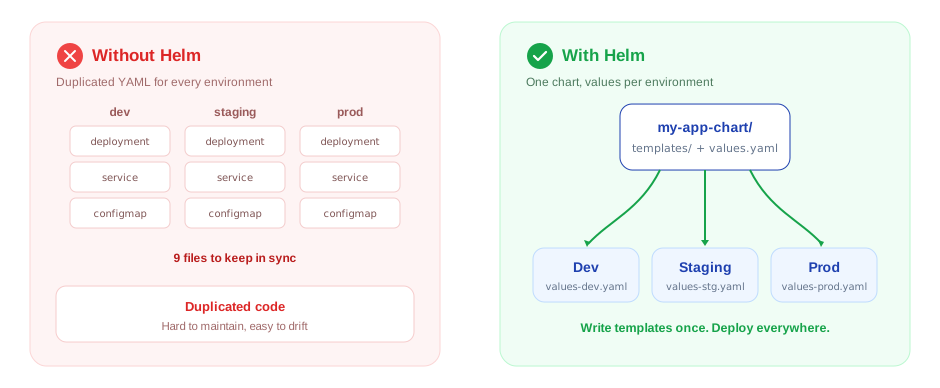
Helm is usually introduced as “the package manager for Kubernetes,” which is true but sells it short. Its real value is replacing piles of nearly-identical YAML with one set of templates plus a small values file per environment. Same chart for dev, staging, and production, only the values change.
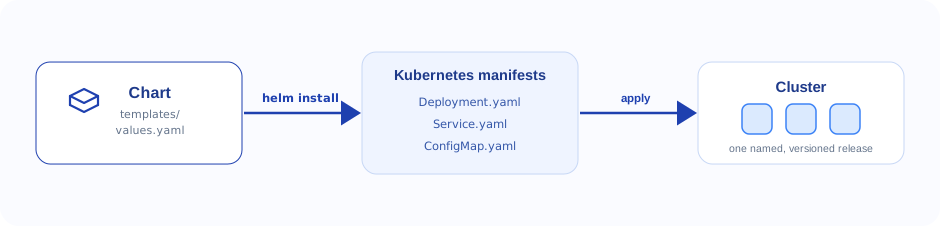
Under the hood there’s no magic to it. A chart is just templates and some default values. Helm fills those templates with your values and hands the finished Kubernetes manifests to the cluster:
Learning a handful of Helm commands takes an afternoon. Designing charts a team can actually rely on in production is where the real engineering starts.
Beyond helm install
Installing an existing chart is only the beginning. The interesting questions come right after: what happens when your application needs custom configuration, several environments, or values that change per deployment? How do you take an existing chart and bend it to your needs, or write one from scratch?
That’s the point where Helm’s structure stops being trivia and starts being useful. Instead of maintaining a separate stack of manifests for every environment, you maintain one chart and a thin values file per environment. Clean, consistent, and far easier to change safely.
It’s also why Helm has become the default way to package, ship, and manage Kubernetes applications on modern DevOps and platform teams.
A glimpse at the CloudMaven program
This is exactly the path we follow in the CloudMaven Internship Training Program, less “here are the commands,” more “here’s how to build something production teams trust.”
Along the way you’ll learn to:
- Read any chart’s structure and adapt it to what your application needs
- Turn plain Kubernetes manifests into reusable Helm templates
- Write your own charts from scratch
- Support multiple environments cleanly with templates and values
- Use Helm’s templating, built-in objects, functions, conditionals and loops
- Debug a failed release by reading the templates, values and rendered manifests
- Handle upgrades, rollbacks and release management without holding your breath
- Work with Helm repositories and third-party charts
The goal isn’t to memorise commands. It’s to reach the point where you understand not just how Helm works, but why production teams lean on it to keep their Kubernetes deployments scalable, reusable, and maintainable.