Kubernetes in Production: From Containers to Scalable Applications
Docker gets your app running. Production asks harder questions, what happens when a server dies at 2am, or traffic doubles overnight? That's the space Kubernetes was built for.
One question comes up again and again the moment someone gets comfortable with containers:
I know Docker. I can build images and run containers. So why do companies still ask for Kubernetes?
It’s a fair question, and it deserves a real answer rather than a buzzword.
Docker is genuinely the right first step. It packages an application so it runs the same way on your laptop, a teammate’s machine, and a server, which quietly kills off a whole category of “works on my machine” problems.
But production asks a harder question than “does it run?” It asks “does it keep running?”
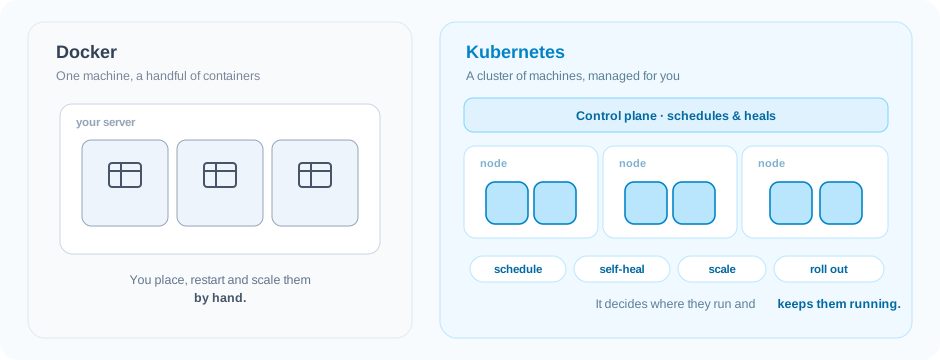
Picture your container running happily on a single server. Now the real world shows up:
- Traffic grows, and one container isn’t enough, you need dozens, spread across several machines.
- A server dies at 2 a.m. Something has to notice and move those containers elsewhere before anyone wakes up.
- Two apps want different amounts of CPU and memory. Something has to place each where it actually fits.
- A new version is ready. You need to roll it out across hundreds of running containers, and roll it back instantly if it misbehaves.
This is the space Kubernetes was built for. It isn’t “Docker, but bigger.” It’s the layer that decides where containers run, keeps them running, connects them, scales them, and updates them, without a human in the loop for every step.
So the real reframe is this: learning Kubernetes isn’t about memorising YAML. It’s about understanding how modern applications actually stay alive in production.
Beyond the Basics
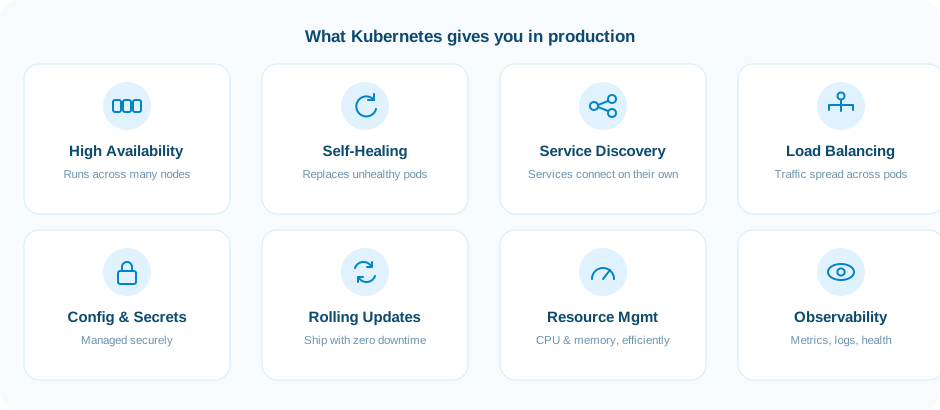
Getting a single app onto Kubernetes is day one. Real workloads need more, high availability, automatic recovery, service discovery, load balancing, secure configuration, sensible resource use, and updates that don’t take the app down.
Those capabilities are what turn a container orchestrator into a production platform. Getting comfortable with them is also what turns “I can deploy this” into “I can operate this.”
A glimpse at the CloudMaven program
This is the mindset the CloudMaven Internship Training Program is built around. Instead of drilling isolated kubectl commands, it’s designed to help you think like an engineer who has to build and operate real Kubernetes applications.
The journey works through the things that actually matter on the job:
- Cluster architecture, nodes, the control plane, and how workloads are placed
- Deployments, ReplicaSets and Pods, managing an application’s lifecycle
- Services and Ingress, exposing applications reliably
- ConfigMaps and Secrets, handling configuration without leaking it
- Requests and limits, keeping workloads stable under load
- Health checks, readiness and liveness probes that matter in production
- Persistent storage, running stateful applications
- Helm, packaging and shipping applications as charts
- Debugging, finding and fixing the failures you’ll actually hit
The aim isn’t to recite commands. It’s to reach the point where you can take any application, containerise it, deploy it to Kubernetes, troubleshoot it when it breaks, and keep it running in something that looks like the real world.