Git & GitHub: Surviving Your First Merge Conflict
Before you write a single line of production code, there's one skill you'll use every day: Git. Here are the fundamentals, plus a walkthrough of the merge conflict that trips up almost every new engineer.
Before you write a single line of production code, there’s one skill you’ll use every single day: Git. In this post we’ll cover the basics and then put you through your paces with a real scenario you’re likely to hit in your first few weeks, a merge conflict with a teammate.
Why Git, Not Just “Save As v2”
Git is a version control system. It records every change you make to your code, who made it, and when. It allows many people to work together on the same project without conflicting with each other, rather than emailing files around or naming things main.tf.v2.
GitHub is where the world builds software. It’s where your team’s Git repositories are hosted online. Git is the tool. GitHub is the shared home for the code.
The Core Vocabulary
- Repository (repo): the project folder, tracked by Git.
- Commit: a saved snapshot of your changes, with a message explaining what changed.
- Branch: an independent line of work, so you can build a feature without touching the stable code.
- Push / Pull: sending your commits to GitHub, or pulling teammates’ commits down to your machine.
- Pull Request (PR): a request to merge your branch into the main branch, usually reviewed by a teammate first.
The Everyday Workflow
# Get the latest code
git pull origin main

# Create your own branch for a task
git checkout -b intern/add-tf-code

# Make changes, then stage and commit them
git add .
git commit -m "Added vnet peering code"

# Push your branch to GitHub
git push origin intern/add-tf-code
From there, you’d open a pull request on GitHub, a teammate reviews it, and once approved, it gets merged into the main branch.
That’s the 90% case. Now let’s talk about the moment that trips up almost every new developer: the merge conflict.
Real Scenario: The Merge Conflict
You’re likely to face this situation in your first month.
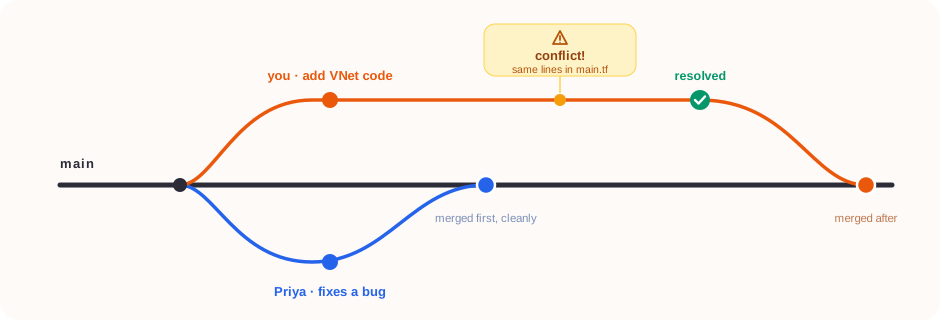
Two branches touch the same lines of main.tf. Priya merges first, cleanly; your merge then stops on a conflict, which you resolve before it lands.
You and another intern, Priya, are both working on main.tf. You’re adding Terraform VNet code. She’s fixing a bug in the Terraform in the same section.
Priya is first; she gets her PR approved and merges to main. You are still on your branch, with no idea that her changes just landed.
You finish your feature and try to merge:
git checkout main
git pull origin main
git checkout intern/vnet-tf-code
git merge main
And Git stops you with this:
Auto-merging main.tf
CONFLICT (content): Merge conflict in main.tf
Automatic merge failed; fix conflicts and then commit the result.
Don’t panic, this is completely normal. It just means Git found two changes to the same lines and can’t guess which one you want. Open the file, and you’ll see conflict markers:
<<<<<<< HEAD
resource "azurerm_virtual_network" "vnet" {
  count                   = var.enable == true ? 1:0
  name                    = format("%s-vnet", module.labels.id)
  address_space           = var.address_spaces
  resource_group_name     = var.resource_group_name
  flow_timeout_in_minutes = var.flow_timeout_in_minutes
=======
resource "azurerm_virtual_network" "vnet" {
  count                   = var.enable != true ? 1:0
  name                    = format("%s-vnet", module.labels.id)
  flow_timeout_in_minutes = var.flow_timeout_in_minutes
>>>>>>> intern/vnet-tf-code
How to resolve it
Read both versions. HEAD is what’s currently in main (Priya’s fix). The bottom section is your incoming branch (your changes).
Combine what’s actually needed, you don’t pick one side, you merge the intent of both:
resource "azurerm_virtual_network" "vnet" {
  count                   = var.enable == true ? 1 : 0
  name                    = format("%s-vnet", module.labels.id)
  address_space           = var.address_spaces
  resource_group_name     = var.resource_group_name
  flow_timeout_in_minutes = var.flow_timeout_in_minutes
}
Remove the conflict markers (<<<<<<<, =======, >>>>>>>), Git leaves them in for you to edit around, but they’re not valid code.
Stage and commit the resolution:
git add main.tf
git commit -m "Merge main into branch, resolve main.tf conflict"
git push origin intern/vnet-tf-code
Re-test. A merge conflict resolution is still a code change. Run your tests before assuming it’s fixed.
Three Habits That Prevent Most Conflicts
- Pull before you start work, not just before you push. Stale branches cause the worst conflicts.
- Keep branches short-lived. The longer your branch diverges from
main, the messier the eventual merge. - Communicate on shared files. A quick message, “Hey, I’m touching
main.tftoday”, saves everyone twenty minutes.
The Takeaway
A merge conflict isn’t Git being difficult, and it isn’t a mistake you made. It’s Git doing its job: refusing to silently discard someone’s work. Read both sides, understand the intent, merge them thoughtfully, and move on.