Getting Started with Docker
How Docker helps developers build, ship, and run applications consistently across different environments, from a laptop to production, and why it ends the era of 'it works on my machine'.
One of the most familiar situations in software development begins with a simple sentence:
“It works on my machine.”
An application may run perfectly on a developer’s laptop but fail in testing or production because of differences in operating systems, dependencies, configurations, or software versions.
Docker helps solve this problem by packaging an application together with everything it needs to run into a standardized unit called a container. This makes applications easier to develop, test, deploy, and maintain across different environments.
What Is Docker?
Docker is a platform for building and running containerized applications.
A container includes:
- Application code
- Runtime and system libraries
- Required dependencies
- Environment configuration
Because these components are packaged together, the application behaves consistently whether it runs on a developer’s laptop, a test server, or a cloud platform.
A simple way to think about Docker is as a standardized shipping container. Shipping containers can carry different products, but their standard shape makes them easy to transport using ships, trains, and trucks. Docker applies the same idea to software: applications can be different internally while still being packaged and operated in a consistent way.
Containers and Virtual Machines
Containers are sometimes compared with virtual machines, but they work differently.
A virtual machine contains an entire operating system, along with the application and its dependencies. This provides strong isolation but usually requires more storage, memory, and startup time.
Containers share the host system’s operating-system kernel while keeping applications and their dependencies isolated. As a result, containers are generally smaller and start faster than virtual machines.
Virtual machines and containers are not necessarily competitors. Many modern systems use both, for example, running multiple Docker containers inside a cloud-based virtual machine.
Understanding Images and Containers
Two of the most important Docker concepts are images and containers.
Docker image
A Docker image is a packaged, read-only template containing the application and everything required to run it. It is similar to a blueprint.
Docker container
A container is a running instance of an image. If an image is the blueprint, the container is the actual structure created from it. Multiple containers can be started from the same image, with each running as an isolated process.
$ docker images
REPOSITORY    TAG       IMAGE ID       CREATED       SIZE
hello-world   latest    xxxxxxxxxxxx   ...           ...

$ docker ps -a
CONTAINER ID   IMAGE         COMMAND    STATUS
xxxxxxxxxxxx   hello-world   "/hello"   Exited (0)
How Docker Works
A basic Docker workflow usually looks like this:
- Developers write the application.
- A
Dockerfiledescribes how to package it. - Docker builds an image using that file.
- The image is stored locally or in a container registry.
- One or more containers are started from the image.
A container registry, such as Docker Hub or a private company registry, provides a central place for teams to store and distribute images.
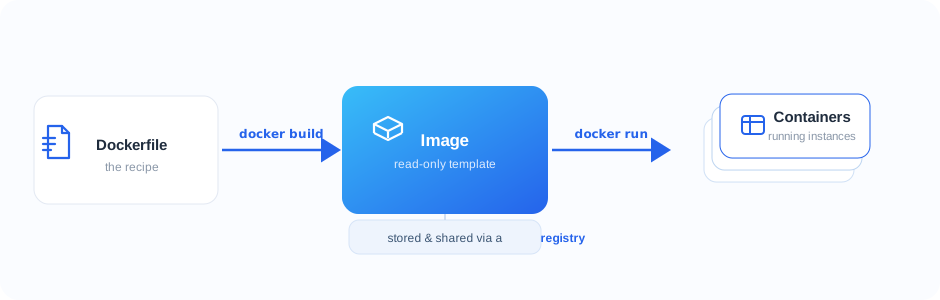
From recipe to running app: docker build turns a Dockerfile into an image, and docker run starts containers from it.
A Simple Docker Example
Suppose we have a small Python application:
print("Hello from Docker!")
We can package it using a Dockerfile:
FROM python:3.12-slim
WORKDIR /app
COPY app.py .
CMD ["python", "app.py"]
Here is what each instruction does:
FROMselects the base image.WORKDIRcreates and selects the application directory.COPYadds the application file to the image.CMDdefines the command executed when the container starts.
We can then build the image:
docker build -t hello-docker .
And run it as a container:
docker run --rm hello-docker
The output will be:
Hello from Docker!
This is a small example, but the same process can be used for web applications, APIs, background workers, databases, and many other services.
Why Teams Use Docker
Consistent environments. Docker helps reduce differences between development, testing, and production environments. Teams can use the same image throughout the delivery process.
Faster onboarding. Instead of manually installing several tools and dependencies, a new developer can often start the required services using a small number of Docker commands.
Dependency isolation. Different applications may require different versions of the same language, library, or database. Containers allow those applications to run independently without creating unnecessary conflicts.
Portability. A properly containerized application can run on any compatible environment with a container runtime, including local machines, servers, CI/CD systems, and cloud platforms.
Easier automation. Docker integrates well with automated testing and deployment pipelines. A pipeline can build an image, run tests against it, and promote the same image to production.
Simple scaling. Because containers are standardized and quick to start, additional instances of an application can be launched when demand increases. Container orchestration platforms can automate this process for larger systems.
Docker Compose
Real-world applications often depend on more than one service. For example, a web application might require a frontend, a backend API, a database, and a cache.
Docker Compose allows these services to be defined in a single YAML file and managed together. A simple configuration might look like this:
services:
  app:
    build: .
    ports:
      - "8000:8000"
  database:
    image: postgres:17
    environment:
      POSTGRES_PASSWORD: example
The complete environment can then be started with:
docker compose up
This is especially useful for local development because the team can share one configuration instead of maintaining lengthy setup instructions.
Good Practices for Getting Started
Docker is easy to begin using, but a few habits make containers safer and more efficient:
- Use small and trusted base images.
- Pin important dependency and image versions.
- Keep passwords and API keys outside Docker images.
- Use a
.dockerignorefile to exclude unnecessary files. - Run applications as a non-root user whenever possible.
- Keep each container focused on a clear responsibility.
- Scan images regularly for known vulnerabilities.
- Treat container data as temporary unless it is stored in a volume or external service.
These practices become increasingly important when containers move from local development into production.
What Docker Does Not Solve
Docker is a useful tool, but it is not a complete solution to every deployment challenge. Teams still need to consider:
- Application configuration
- Security and access controls
- Logging and monitoring
- Persistent data
- Networking
- Backups and recovery
- Container orchestration
- Infrastructure management
Docker standardizes how an application is packaged and executed. It works best when combined with good engineering and operational practices.
Final Thoughts
Docker has changed the way many teams build and deliver software by making application environments more consistent and portable. Its main idea is simple: package the application and its dependencies together, then run that package consistently wherever it is needed.
You do not need a large distributed system to benefit from Docker. It can be valuable for a small development project, a shared testing environment, or a production application. Starting with one service and a basic Dockerfile is often enough to understand its benefits.
The next time someone says, “It works on my machine,” Docker may help turn that into: “It works wherever we run it.”