Getting Started with Ansible
A practical introduction to Ansible, its agentless architecture, core components, and a hands-on example that installs and configures Nginx across multiple servers with a single playbook.
1. Introduction
As IT infrastructure grows in size and complexity, managing servers and applications manually becomes increasingly challenging. Repetitive administrative tasks lead to configuration inconsistencies, deployment delays, and human errors, making infrastructure management both time-consuming and hard to scale.
Ansible is an open-source automation tool that simplifies configuration management, application deployment, and infrastructure provisioning. Its agentless architecture and easy-to-read YAML syntax enable IT teams to automate routine tasks, maintain consistent configurations, and manage multiple systems efficiently, without installing software agents on target machines.
In this blog, we’ll cover the fundamentals of Ansible, explore its core components, understand how it works, and walk through a practical example.
2. What is Ansible & Why Use It?
Ansible is an open-source IT automation tool developed by Red Hat that simplifies configuration management, application deployment, infrastructure provisioning, and orchestration. It automates repetitive tasks using simple, human-readable YAML playbooks.
Unlike many automation tools, Ansible follows an agentless architecture, communicating with managed nodes over SSH (Linux) and WinRM (Windows). This eliminates the need to install and maintain software agents on target systems, reducing operational complexity.
🚀 Why Choose Ansible?
- Agentless – No agent installation on managed nodes; connects over SSH/WinRM.
- Simple to learn – YAML-based playbooks are human-readable and easy to write.
- Open source – Free, with strong community support and enterprise backing from Red Hat.
- Idempotent – Tasks apply only when a change is needed, preventing unnecessary updates.
- Scalable – Manages a few servers or thousands from a single control node.
- Multi-platform – Linux, Windows, cloud (AWS, Azure, GCP), network devices, containers, Kubernetes.
- Reusable – Roles and modules keep automation modular and maintainable.
- Easy integration – Fits into CI/CD pipelines, cloud platforms, and DevOps toolchains.
- Consistent – Configures all systems uniformly, reducing configuration drift.
Note on idempotency: Some modules (e.g.
aptwithupdate_cache: yes) reportchangedon every run because the action itself always executes. This does not contradict idempotency, the target state remains consistent.
3. Ansible Architecture
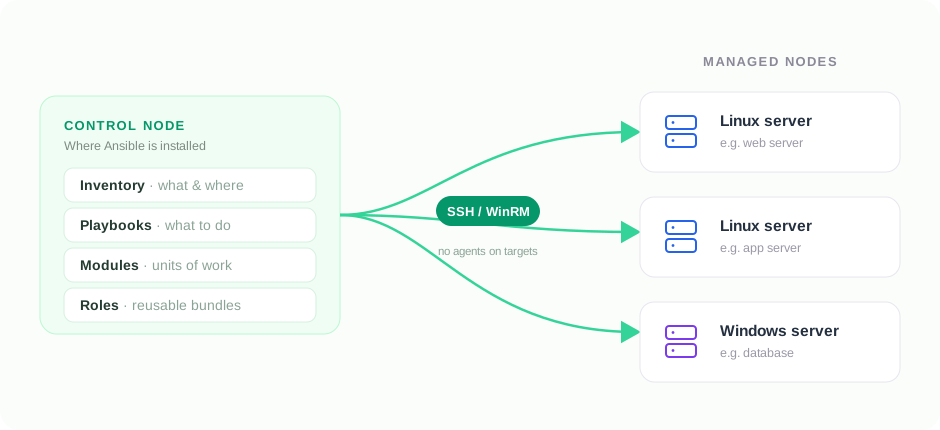
Ansible follows a control node – managed node architecture.
- Control Node – The machine where Ansible is installed. Stores the inventory, playbooks, roles, and modules, and executes automation tasks.
- Managed Nodes – Target servers or devices Ansible manages: Linux servers, Windows servers, cloud instances, network devices, or containers.
- Connection Protocol – SSH for Linux, WinRM for Windows. No agents required on targets.
4. Installing Ansible
Ubuntu / Debian:
sudo apt update
sudo apt install ansible -y
RHEL / CentOS (8+ / modern):
sudo dnf install ansible -y
On CentOS 7 and older, use
sudo yum install ansible -y.
Verify installation:
ansible --version
On success, the command displays the installed Ansible version along with Python and configuration details.
5. Core Components of Ansible
Ansible consists of several core components that work together to automate IT tasks.
| Component | Description |
|---|---|
| Control Node | Machine where Ansible is installed and from which tasks run. |
| Managed Nodes | Target systems (Linux, Windows, cloud, network devices) that Ansible manages. |
| Inventory | File listing managed nodes, organized into groups. |
| Playbooks | YAML files defining the automation tasks to execute. |
| Modules | Pre-built units of work (install packages, copy files, manage services). |
| Tasks | Individual actions within a playbook, executed sequentially. |
| Roles | Structured way to organize playbooks, variables, templates, and tasks for reuse. |
| Variables | Values that make playbooks dynamic and reusable across environments. |
| Handlers | Special tasks that run only when notified (e.g. restart a service after a config change). |
| Facts | Info auto-gathered about nodes: OS, IP, memory, CPU. |
📋 Inventory
An Inventory is a file that contains the list of hosts (managed nodes) that Ansible will manage. It also allows you to organize hosts into groups and define connection details such as the SSH user and private key.
Example: inventory.ini
# Web Servers
[webservers]
web-server-01 ansible_host=192.168.1.10
web-server-02 ansible_host=192.168.1.11

# Database Server
[dbservers]
db-server-01 ansible_host=192.168.1.20

# Variables applied to all hosts
[all:vars]
ansible_user=ubuntu
ansible_ssh_private_key_file=~/.ssh/id_rsa
| Inventory Entry | Description |
|---|---|
[webservers] | Group named webservers; all web servers listed under it. |
web-server-01 | Hostname (alias) Ansible uses to identify the server. |
ansible_host=192.168.1.10 | Actual IP address of the managed node. |
[dbservers] | Group for database servers. |
[all:vars] | Variables applied to every managed node. |
ansible_user=ubuntu | SSH user Ansible connects as. |
ansible_ssh_private_key_file=~/.ssh/id_rsa | Private SSH key used for authentication. |
📖 Playbooks
A Playbook is a YAML file that defines the automation tasks Ansible should perform on managed hosts. Playbooks allow administrators to automate repetitive tasks in a consistent and repeatable manner.
Example:
---
- hosts: webservers
  become: true

  tasks:
    - name: Install Nginx
      apt:
        name: nginx
        state: present
| Key | Description |
|---|---|
hosts | Target systems where the playbook runs. |
become | Runs tasks with elevated (sudo) privileges. |
tasks | List of automation tasks to perform. |
apt | Installs/manages packages on Debian-based systems. |
🧩 Modules
Modules are the building blocks of Ansible, they perform specific actions such as installing software, copying files, managing users, or controlling services. Common modules:
apt– Installs packages on Debian-based systems.yum/dnf– Installs packages on RHEL-based systems.service– Starts, stops, or restarts services.copy– Copies files to managed hosts.file– Creates or manages files and directories.
Modules remove the need for complex shell scripts and ensure consistent, idempotent task execution.
🏗️ Roles
As projects grow, playbooks get long and hard to manage. Roles organize Ansible content into a standardized directory structure, making automation reusable and modular.
roles/
└── nginx/
    ├── tasks/
    ├── handlers/
    ├── templates/
    ├── files/
    ├── vars/
    └── defaults/
6. Practical Example: Install & Configure Nginx
We’ll use Ansible to install, configure, and start the Nginx web server on multiple managed nodes.
🎯 Objective
- Install the Nginx package.
- Deploy a config file and restart Nginx only when it changes (via a handler).
- Start Nginx and enable it on boot.
- Apply the same config across multiple servers with one playbook.
📁 Project Structure
ansible-nginx/
├── inventory.ini
└── install-nginx.yml
📝 Step 1: Create the Inventory File
File: inventory.ini
[webservers]
web01 ansible_host=192.168.1.10
web02 ansible_host=192.168.1.11

[all:vars]
ansible_user=ubuntu
ansible_ssh_private_key_file=~/.ssh/id_rsa
📝 Step 2: Create the Playbook
File: install-nginx.yml
---
- name: Install and Configure Nginx
  hosts: webservers
  become: true

  tasks:
    - name: Update package cache
      apt:
        update_cache: yes

    - name: Install Nginx
      apt:
        name: nginx
        state: present

    - name: Deploy Nginx config
      copy:
        src: files/nginx.conf
        dest: /etc/nginx/nginx.conf
      notify: Restart Nginx

    - name: Start Nginx service
      service:
        name: nginx
        state: started
        enabled: true

  handlers:
    - name: Restart Nginx
      service:
        name: nginx
        state: restarted
The notify / handlers pair restarts Nginx only when the config file actually changes, a core idempotent pattern.
▶️ Step 3: Execute the Playbook
ansible-playbook -i inventory.ini install-nginx.yml
📋 Expected Output
PLAY [Install and Configure Nginx]

TASK [Update package cache]
ok: [web01]
ok: [web02]

TASK [Install Nginx]
changed: [web01]
changed: [web02]

TASK [Start Nginx service]
changed: [web01]
changed: [web02]

PLAY RECAP
web01 : ok=3 changed=2 failed=0
web02 : ok=3 changed=2 failed=0
🔍 Understanding the Workflow
- Ansible reads the server list from
inventory.ini. - It connects to each server over SSH.
- The package cache is updated and Nginx is installed if absent.
- If the config changes, the handler restarts Nginx.
- The service is started and enabled on boot.
7. Best Practices
Following best practices makes Ansible automation secure, reusable, and easy to maintain.
- Organize with roles – Break large playbooks into roles for readability and reuse.
- Avoid hardcoding – Use variables so the same playbook works across environments.
- Secure secrets – Store passwords, API keys, and credentials in Ansible Vault, never plain text.
- Use meaningful names – Descriptive names for playbooks, tasks, and variables ease troubleshooting.
- Keep playbooks focused – Smaller, single-purpose playbooks are easier to maintain.
- Test before production – Validate in a dev/staging environment first.
- Use version control – Track changes and collaborate via Git.
- Prefer modules over shell – Built-in modules are idempotent and more reliable than
shell/command. - Group hosts logically – e.g.
webservers,appservers,dbservers. - Least privilege – Grant only the permissions Ansible needs.
🚫 Common Mistakes to Avoid
- Storing passwords or API keys in plain-text files.
- Writing one giant playbook for every task.
- Running in production without testing.
- Repeating tasks instead of building reusable roles.
- Skipping task names, making output hard to read.
- Overusing
shellwhen a dedicated module exists.
8. Conclusion
Ansible is a powerful yet approachable automation tool for configuration management, application deployment, and infrastructure provisioning. Its agentless architecture, YAML playbooks, and rich module ecosystem let IT teams automate repetitive tasks efficiently while keeping systems consistent.
In this blog we covered the fundamentals of Ansible, its core components, and a practical example showing how automation simplifies everyday administration. Whether you manage a handful of servers or a large fleet, Ansible offers a reliable, scalable approach to infrastructure automation, an essential tool in modern DevOps.